




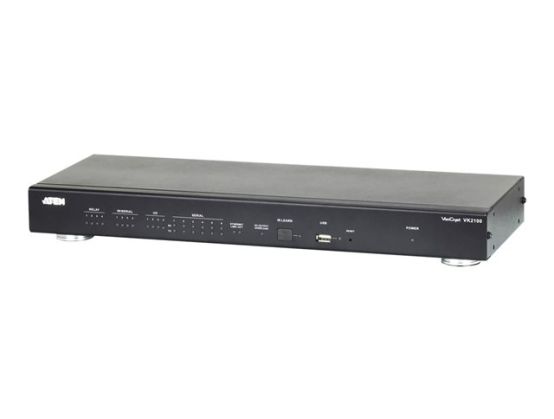
The ATEN Control System, incorporating the VK2100 (ATEN Control Box), the VK6000 (ATEN Configurator) and the ATEN Control System App is a standard Ethernet-based management system that connects all the hardware devices in a room or large facility to provide centralized control directly and effortlessly via a mobile device and tablet computer. The VK2100 works as the main controller that provides connectivity to all the hardware devices found in a room. After connecting the hardware, the VK6000 software provides setup of the device configuration and controls in 4 easy steps. The ATEN Control System App then connects you to the VK2100 from any iOS, Android or Windows mobile device / tablet computer which empowers you with mobility to control all the hardware devices, in different rooms, whenever and however you like.¦The VK2100 easily deploys into an existing installation and integrates seamlessly with ATEN VanCryst pro-A/V products and nearly any other hardware device found in a room, including A/V equipment, lighting, conference systems, air conditioning, motion sensors, power switches and many more. The VK2100 serves as the central platform where hardware devices are connected - to be monitored, managed and controlled directly via a tailormade GUI from any iOS, Android or Windows mobile device.¦The VK6000 software facilitates a quick setup of the hardware devices and controls in 4 easy steps via an intuitive GUI. The VK6000 walks you through configuring the hardware, designing the interface and uploading viewer profiles to the VK2100. To provide control of the hardware devices, Viewer Profiles are imported via the ATEN Control System APP from any iOS, Android or Windows mobile device. Through an Ethernet connection, the ATEN Control System App enables you to import and update viewer profiles from the VK2100 via a point-ntap user interface. Each viewer profile provides a customized control GUI that grants you quick access to target and control hardware devices. Use of any profile is protected with password authentication to ensure system access.¦The ATEN Control System is perfectly applicable in meeting rooms, conference centers, boardrooms, classrooms or any room that requires central control of a variety of hardware devices through a streamlined management system with optimum efficiency and performance.
- VK2100 KEY SELLING POINTS
- Supports various interface connections: 6 x Serial port, 4 x IR/Serial port, 4 x Relay channel, 4 x I/O channel, 1 x Ethernet port
- 4 x DC output for power supply connections
- 1 x USB port for easy profile upload
- IR learning function for adding IR device drivers
- Easily configure system settings via web GUI
- LED indication for hardware status and active messages
- SSH tool to monitor the input and output signals of the Control Box
- Rack-mountable
- VK6000 KEY SELLING POINTS
- Simple profile setup in 4 easy configuration steps via intuitive GUI
- Custom design the GUI and controls for use on mobile devices and tablet computers
- Built-in Database Generator for device driver setup and overall device management
- Built-in ATEN Library comprising 10,000+ device drivers and complete ATEN VanCryst product drivers
- Supports Telnet, TCP, ONVIF, and PJLink protocols for controlling LAN devices over a network
- Test tool to verify commands in action before uploading the profile to the VK2100
- Simulator to simulate and review the customized GUI before uploading
- ATEN Control System App KEY SELLING POINTS
- Allows administrators central control of multiple rooms via profiles on a mobile device or tablet computer
- Restrict user access to profiles via password authentication
- Synchronization of system controls amongst multiple mobile devices and tablet computers
- Any iOS, Android, or Windows mobile device can be used to control the system - no need to purchase costly exclusive user panels
Expandable and manageable device library
The ATEN Library is comprised of 10,000+ device drivers along with a complete line of ATEN VanCryst product drivers. This extensive portfolio of driver resources is built into the VK6000 system which makes hardware installation as easy as plug-n-play. The device database can be expanded by adding new devices to the Database Generator which comes in handy when the system fails to locate a specific driver from the ATEN Library. Furthermore, device management is simplified using My Library which consolidates device information in an organized list for faster hardware setup during projects. This expandable and manageable device database is beneficial and time-efficient as the scope and size of installations grow.
Simplified setup via intuitive GUI design
The ATEN VK6000 Configurator software offers an intuitive and streamlined GUI to simplify the hardware setup in 4 easy steps: create a project > device configuration > create viewer & design > upload profile. Operations for any room can be customized in a profile that is a programmable GUI designed for the mobile device or tablet computer's screen size, signifying "what you see is what you get". You can also customize the actions, commands and icon of any control button for easy GUI operation. All control operations can be examined beforehand via a simulator and a test tool to verify how each configuration will respond and appear on the mobile device, avoiding the need for re-configuration after the profile has been imported to the device. This straightforward and streamlined approach is helpful in boosting system setup without repetitive checks to get system administrators acclimated and started with device management effortlessly.
System facilitation with multiple control box / profile / device control
While plotting your installation, system control can start with one room and scaleup to multiple rooms in the same area or across regions. From an iOS, Android, or Windows mobile device, toggling between profiles imported from the Control Box (VK2100) facilitates system control of different rooms with simple point-n-tap operations. Meanwhile, multiple devices can be authorized with control over the same room simultaneously, depending on the licenses. On the other hand, access to any profile from a mobile device can be restricted with password authentication to enhance system security. This versatile system framework is beneficial as system control can be easily updated to respond promptly and flexibly to any changes.