


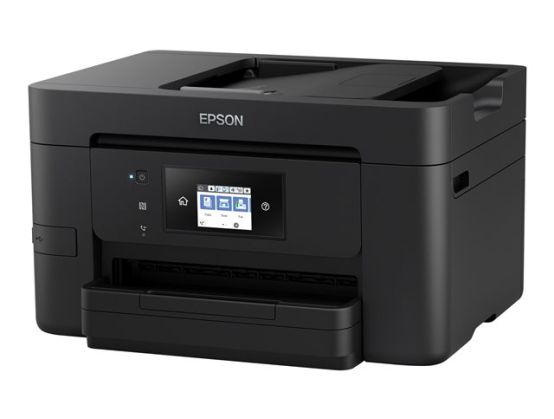
Style and substance¦With its modern design, the compact WF-3720DWF is a great fit for the home or office. Its stylish and sleek design is complemented by a 6.8cm touchscreen.¦Business quality¦Even at high speeds, this 4-in-1 printer produces top quality, laser-like prints thanks to Epson's most advanced printhead technology, PrecisionCore. The WF-3720DWF is designed for business with double-sided printing, a 35 page automatic document feeder and 250 sheet paper tray. It also supports advanced Scan-to functions including Scan-to: Email, Cloud, FTP and Network.¦Low running costs¦Achieve professional, crisp and clear business documents that are water, smudge and highlighter resistant, with Epson's DURABrite Ultra Ink. Offering great value, the inks are supplied individually, so you only ever have to replace the colour used. Plus, with XL cartridges you can print up to three times more pages - that equates to 1,100 black and 950 colour pages⁴.¦Print from anywhere¦From your home or office, there's the option to use Wi-Fi connectivity or Wi-Fi Direct for printing from compatible wireless devices without a Wi-Fi network. You can also print via NFC with a simple tap of a compatible Android device on the printer . And there's Epson's free mobile printing apps and solutions including Email print, which allows you to send items to print from almost anywhere in the world .
- Print, scan, copy and fax: 4-in-1with fast duplex printing
- Fast business-quality printing: 20ppm in black 10ppm in colour
- Connectivity: Wi-Fi, Wi-Fi Direct, NFC and Ethernet
- Front paper tray: 250-sheet capacity
- Epson's free mobile printing apps: Freedom to print and scan anywhere
Compact 4-in-1 boasting business features
Looking for a space-saving, cost-effective, yet advanced printer? With Wi-Fi, Wi-Fi Direct and fast double-sided printing, this stylish 4-in-1 is a great choice for home offices or small businesses.
Introducing the WorkForce Pro WF-3720DWF
Work flexibly with the WF-3720DWF using its range of connectivity features including wireless, Wi-Fi Direct, Ethernet, and NFC . There's also Epson's free mobile printing apps and solutions including Email print , which allows the user to send items to print from almost anywhere in the world.
Compact and mighty
If space is at a premium in your home office or small business, Epson has the solution with its compact 4-in-1 offering print, scan, copy and fax. Designed for business printing, it utilises Epson's PrecisionCore printhead technology to deliver high-quality prints, even at high speeds.
Print more for less
With Epson's 34 series DURABrite Ultra Inks, you can produce professional looking documents that are water, smudge and highlighter resistant. The inks are also great value as they're supplied individually, so only the colour used is replaced. And with the XL cartridge, you can print up to three times more pages as it provides high yields. In fact, you could print up to 1,100 black and 950 colour pages⁴- helping you minimise your costs and less time changing cartridges.
Easy-to-use business features
Helping you maximise productivity, everyday tasks can be actioned swiftly with the automatic document feeder (ADF), print speeds of up to 20 pages per minute⁵, fast double-sided printing and a 250-sheet paper tray. It's also easy to share and organise documents with Scan-to: Email, Cloud, FTP and Network options.
Simple networking
For printing on the go you can use Wi-Fi connectivity to print from anywhere in the office; Wi-Fi Direct to print from compatible wireless devices without a Wi-Fi network; and NFC to print with a tap of a compatible Android device on the printer.
Print from anywhere
With Email Print you can print your documents from anywhere in the world by sending them straight to the printer via email. You can even print photos, documents and web pages from your smartphone or tablet with the Epson iPrint app. And with the remote print driver, it's possible to send items to print from beyond your home or office network.
Easy PC-free printing
Using the stylish and integrated touchscreen, you can glide through the printers options and settings with ease using the intuitive user interface.