
All hybrid fan pin headers can automatically detect the type of cooling device whether it be fan or pump with different PWM or Voltage mode. Supports up to 2 amps with built-in overcurrent protection - a must for high-end high current fans. Choose from different modes, Quiet to full speed, to match your system usage scenario. For each fan or pump, you can use the intuitive fan curve to define trigger thresholds and corresponding fan speeds. The enhanced BIOS interface also has the advanced features seen in the Smart Fan 5 UI, such as: the ability to set triggers based on different temperature sensors on the board, fan curve definition and the temperature interval setting, which can prevent fan rotation noise caused by sudden temperature change-all without having to load Windows.
- All hybrid fan pin headers
- Smart fan 5 software
- Enhanced BIOS interface
- Fast onboard storage with NVMe
- Next generation SATA express
- 2-way crossfire multi graphics
- Intel GbE LAN Internet accelerator networking
- Intel vPro technology
- High definition digital outputs
- Anti-sulfur resistor design
- GIGABYTE APP center
- System information viewer
- 4K ultra HD support
- The next generation multimedia interface
All hybrid fan pin headers
All hybrid fan pin headers can automatically detect the type of cooling device whether it be fan or pump with different PWM or Voltage mode. Supports up to 2 amps with built-in overcurrent protection - a must for high-end high current fans.
Smart fan 5 software
Choose from different modes, Quiet to full speed, to match your system usage scenario. For each fan or pump, you can use the intuitive fan curve to define trigger thresholds and corresponding fan speeds.
Enhanced BIOS interface
The enhanced BIOS interface also has the advanced features seen in the Smart Fan 5 UI, such as: the ability to set triggers based on different temperature sensors on the board, fan curve definition and the temperature interval setting, which can prevent fan rotation noise caused by sudden temperature change-all without having to load Windows.
Fast onboard storage with NVMe
GIGABYTE M.2 solution offers considerably faster storage performance and support for both PCIe and SATA interfaces for M.2 SSD devices.
Next generation SATA express
SATA Express combines the benefits of PCI Express and SATA to provide much higher bandwidth, featuring data transfer rates of up to 16 Gb/s. The use of SATA Express disables SATA connectors.
2-way crossfire multi graphics
Multi-graphics configuration offers better graphics performance for gaming enthusiasts who demand the highest frame rates without compromising on resolution.
Intel GbE LAN Internet accelerator networking
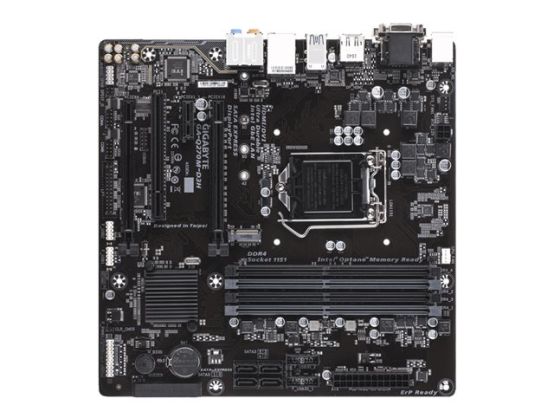
The Q270M-D3H motherboard comes equipped with Intel Gigabit LAN networking, a popular choice with gamers that features several performance-enhancing features such as advanced interrupt handling to help reduce CPU overhead and Jumbo Frame support for extra large data packets.
Intel vPro technology
Intel vPro technology is a set of security and manageability capabilities built into Intel Core processor family, Intel chipsets, and network adapters which can simplify and accelerate critical IT functions
High definition digital outputs
Enjoy true HD display capability using the most commonly integrated digital output technologies on today's HD displays and TVs.
Anti-sulfur resistor design
Sulfur compounds in the air can penetrate tiny onboard resistors creating chemical change and causing these resistors to open or short. If either of these occurs the motherboard will fail to function. By equipping resistors with an Anti-Sulfur Design GIGABYTE gives Ultra Durable Motherboards a whole meaning.
GIGABYTE APP center
The GIGABYTE APP Center gives you easy access to a wealth of GIGABYTE apps that help you get the most from your GIGABYTE motherboard. Using a simple, unified user interface, GIGABYTE APP Center allows you to easily launch all GIGABYTE apps installed on your system, check related updates online, and download the latest apps, drivers, and BIOS.
System information viewer
GIGABYTE System Information Viewer is a central location that gives you access to your current system status. Monitor components such as the clocks and processor, set your preferred fan speed profile, create alerts when temperatures get too high or record your system's behavior; these are the possibilities of the System Information Viewer.
@BIOS
The GIGABYTE @BIOS app allows you to update your system's BIOS from within Windows using a simple and slick graphical user interface. @BIOS can automatically download the latest version from the GIGABYTE servers or you can update your BIOS from a file on your computer. @BIOS also allows you to save your current BIOS to a file, recover your previous BIOS from an image and backup your BIOS to an image.
4K ultra HD support
4K resolution is the technological milestone in high-definition content delivery, utilizing approximately 4000 pixels on the horizontal axis, more than four times today's standard HD pixel density. GIGABYTE motherboards provide native 4K support with integrated Intel HD Graphics via HDMI.
The next generation multimedia interface
HDMI is a High-Definition Multimedia Interface which provides up to 5 Gb/s video transmitting bandwidth and 8-channel high quality audio all through a single cable. Able to transmit superior, uncompressed digital video and audio, HDMI ensures the crispest rendering of digital content up to 1080p without the quality losses associated with analog interfaces and their digital-to-analog conversion. In addition, HDMI is compatible with HDCP (High-bandwidth Digital Content Protection), allowing the playback of Blu-ray/HD DVD and other protected media content.