




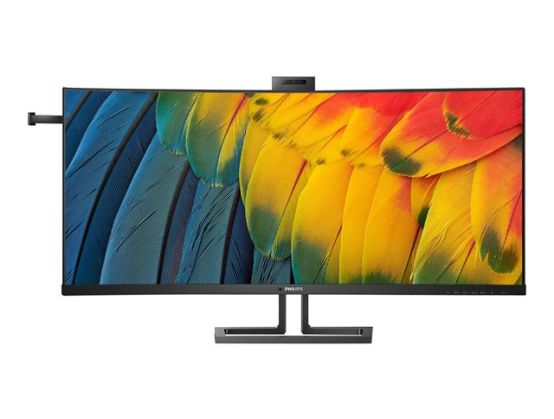
The Philips Thunderbolt 4 monitor delivers a secure, reliable one-cable docking solution, delivering sharp images, and a noise-cancelling mic lets people hear you clearly. Features a pop-up webcam for quick access and robust security.
- Lightning-fast connectivity for data, video and Ethernet
- Simple and powerful daisy chaining for multi-monitor setups
- 5K2K (5120 x 2160) resolution for fine details
- Webcam with noise-canceling microphone for collaboration
- Eyesafe blue light protection and color accuracy
- Tilt, swivel and height adjustment for an ideal viewing position
- PowerSensor saves up to 80% energy costs
- Built-in KVM switch to easily switch between sources
- Accessory within reach
- IPS LED wide view technology for image and color accuracy
Lightning-fast connectivity for data, video and Ethernet
This Philips docking monitor is one of the world's first Thunderbolt 4 monitors with USB4 compliance. Compared with conventional USB-C monitors, Thunderbolt 4 technology provides lightning-fast 40 Gbps data transfer speeds, supplying high-resolution video, multi-stream transport for daisy chaining, up to 90 W power delivery for devices and a stable 1 Gbit/s Ethernet connection, all through a single cable. Thunderbolt 4 delivers a slim, reversible, one-cable USB-C docking solution to create a sleek, clutter-free desktop, greatly boosting productivity.
Simple and powerful daisy chaining for multi-monitor setups
Daisy chaining allows you to drive multiple monitors and devices from a single Thunderbolt port on your laptop. From the Thunderbolt port of your laptop, connect to this monitor, then from the second Thunderbolt port on this monitor you can connect to a second 4K monitor.
UltraWide 5K2K (5120 x 2160) resolution for fine details
With UltraWide 5K2K resolution, the colour depth is delivered more vividly and the fine details of the visuals can't be missed. Productivity is redefined thanks to the additional screen space.
IPS LED wide view technology for image and colour accuracy
IPS displays use an advanced technology that gives you extra-wide viewing angles of 178/178 degrees, making it possible to view the display from almost any angle. Unlike standard TN panels, IPS displays give you remarkably crisp images with vivid colours, making them ideal not only for Photos, movies and web browsing, but also for professional applications that demand colour accuracy and consistent brightness at all times.
Webcam with noise-cancelling microphone for collaboration
This Philips monitor comes with a built-in 5 MP webcam, a noise-cancelling microphone, and speakers, making it perfect for working from home and collaborating remotely. The webcam is certified for Windows Hello and is equipped with advanced sensors for Windows Hello facial recognition, which conveniently logs you into your Windows devices in less than 2 seconds. The physical camera switch offers extra privacy when not in use. The noise-cancelling microphone and dual 5 watt integrated speakers deliver clear communications.
Accessory within reach
The unique design of the headphone hook on the side of the Philips monitor brings the tidiness and cable management of your working station to the next level. Its easy access lets you put aside your headphones easily, making sure that all of the accessories you need are within reach.
Eyesafe-certified blue light protection and colour accuracy
Philips display meets the TUV Rheinland Eyesafe standard to truly protect you from long exposure to blue light. The always-on blue light filter not only helps reduce digital eye strain, but also guarantees colour integrity.
Tilt, swivel and height-adjust for an ideal viewing position
The Compact Ergo Base is a people-friendly Philips monitor base that tilts, swivels and height-adjusts so each user can position the monitor for maximum viewing comfort and efficiency.
Built-in KVM switch to easily switch between sources
With the MultiClient Integrated KVM switch, you can control two separate PCs with one monitor-keyboard-mouse setup. A convenient button allows you to quickly switch between sources. Handy with setups that require dual PC computing power or sharing one large monitor to show two different PCs.
PowerSensor saves up to 80% energy costs
PowerSensor is a built-in'people sensor' that transmits and receives harmless infrared signals to determine if the user is present and then automatically reduces monitor brightness when then user steps away from the desk, cutting energy costs by up to 80 percent and prolonging monitor life