




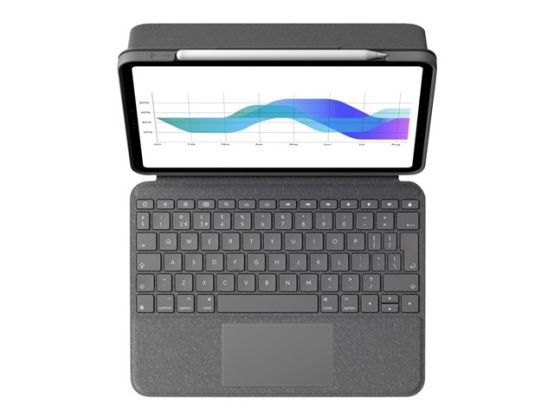
Use your iPad in whole new ways thanks to an adjustable kickstand, foldable keyboard, and a high-precision trackpad for greater control in your favorite apps.
- Stunning precision and control
- All the Multi-Touch gestures you love
- Type away, day or night
- Comfortable, laptop-like keys
- Full row of shortcut keys
- Perfect view for any task
- Foldable keyboard for more versatility
- Power and pair in one click
- Front, back, and corner protection
One case to do it all
Type, view, sketch, and read with Folio Touch, the incredibly versatile keyboard case with trackpad for iPad Air . Use your iPad in whole new ways thanks to an adjustable kickstand, foldable keyboard, and a high-precision trackpad for greater control in your favorite apps
Stunning precision and control
Utilize the high-precision trackpad to increase your productivity in apps like Notes, Pages , Numbers , and Keynote . Highlight spreadsheet cells, copy words, and edit emails on your iPad quicker than ever before
All the Multi-Touch gestures you love
The large trackpad supports all the multi-touch gestures you already know like swipe, scroll, switch apps, and more. Multi-touch gestures help you complete tasks fast and maximize your productivity
Type away, day or night
Backlit keys automatically adjust to your current environment. If you need more or less light, key brightness levels are adjustable on the keyboard so you can keep working late into the night or in other low light environments
Comfortable, laptop-like keys
Logitech crafts high-quality, award-winning keyboards-it's how we've sold over 400 million of them. And we've poured all that experience into Folio Touch. The laptop-like keyboard features large, comfortable keys that deliver the perfect bounce every time for fast, accurate typing
Full row of shortcut keys
Forget hunting around the screen or in menus to perform simple actions-Folio Touch features a full row of iPadOS shortcut keys for one-tap access to popular functions including volume and media controls, brightness levels, and more
Four versatile use modes
Folio Touch has four use modes to help you accomplish any task. TYPE MODE: Type comfortably and accurately with large, well-spaced backlit keys. VIEW MODE: Fold the keyboard and kickstand back, and you're ready to watch movies and shows. SKETCH MODE: Push the screen to a lower angle for sketch mode, perfect for drawing or taking notes with a digital pencil. READ MODE: Enjoy hours of e-books and articles in a true read mode with nothing between you and your beautiful iPad screen. Image: Create a collage that includes four modes/four lifestyle images
The perfect view for any task
Adjustable kickstand with 40° of viewing angles ensures you always have a good view whether you're sketching a diagram or watching your favorite show. A sturdy mechanical hinge holds the kickstand firmly in place, even with strong tapping
Foldable keyboard for more versatility
When you don't need to type, the foldable keyboard moves out of sight for true sketch and view modes with nothing between you and your gorgeous iPad screen
Perfectly complements ipad
Folio Touch was designed to look and feel like a natural extension of your iPad. The clean design and smooth woven outer fabric blend so seamlessly with the aesthetics of your iPad, you'll wonder how you ever went without it
Power and pair in one click
Instantly pairs with your iPad via the Smart Connector. And batteries aren't included, because you'll never need them-power for Folio Touch is sourced directly from iPad
Military-grade protection
Looking for total protection? Look no more. A sturdy case with a secure magnetic latch meets military drop-test standards (MIL-STD 810G) and keeps the front, back, and corners of your iPad Pro protected from bumps and scratches
Home for Logitech crayon
Constantly misplacing your Logitech Crayon? Folio Touch has you covered. A built-in storage space keeps your Logitech Crayon secured and always in reach when you need it
Supports Apple Pencil
Folio Touch is designed to let you attach Apple Pencil right to iPad. No need to remove the case