




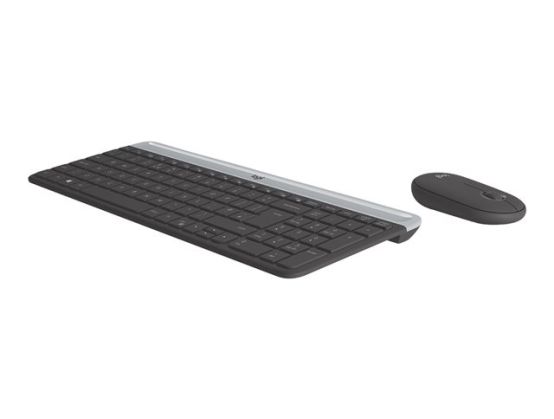
Make any space minimalist, modern, and whisper-quiet with the MK470 Slim Wireless Combo – an ultra-thin, compact and design-forward keyboard and mouse combo perfect for getting things done efficiently.
- Compact modern designed keyboard features low-profile scissor keys, number pad and an optimised layout for Windows Comfortable ambidextrous 3-button mouse with high precision optical tracking and mechanical scroll wheel
- Whisper-quiet keyboard and lab-tested, noise-reduced mouse means an ultra-quiet work experience for you and those around you
- Simple plug-and-play USB nano receiver offers a strong reliable 2.4 GHz wireless connexion with 10 metres (33ft) of range
OWN YOUR SPACE
Make any space minimalist, modern, and whisper-quiet with the MK470 Slim Wireless Combo – an ultra-thin, compact and design-forward keyboard and mouse combo perfect for getting things done efficiently
MINIMALIST. MODERN. SLIM
The MK470 Slim Combo stands out for its simplicity. The slim profile and minimalist design transform your keyboard and mouse into a visual statement for a clean, sleek desk setup
SPACE-SAVING PRODUCTIVITY
The compact keyboard includes a number pad and 12 FN shortcuts, giving you all the keys you need. The slim mouse is extra portable and you can easily store it in your laptop bag or in your pocket for on-the-go productivity. The combo's smaller footprint means you can work on the tightest desk spaces and keep your mouse comfortably within reach
FLUID, COMFORTABLE TYPING & MOUSING
Low-profile scissor keys provide a fluid and familiar laptop-like typing experience. The smooth pebble shape of the ambidextrous mouse feels great in either hand
WHISPER-QUIET WORK
A quiet keyboard and lab-tested, 90% noise-reduced mouse mean an ultra quiet work experience for you and those around you
EASY, RELIABLE WIRELESS
A simple plug-and-play USB receiver offers a strong 2.4 GHz wireless connection with 10 meters of range . This means you will have a clean, cable-free desk and the freedom to arrange your devices the way you want-where you want
GO LONGER BETWEEN BATTERIES
18-month battery life for the mouse, and 36-month battery life for the keyboard means you don't have to worry about losing power. Both accessories go into battery-saving sleep mode when not in use
COMPLETE WITH AUDIO AND VIDEO
Great video and audio go a long way in boosting communication in virtual meetings and presentations. Add a modern webcam and headset to complete your work-from-home setup. Choose matching colorways or mix and match!
HOW TO SET UP KEYBOARD. STEP 1
Remove the Pull-Tab First, pull the tabs protecting the batteries from your mouse and keyboard. Your Slim Combo MK470 will automatically turn on
STEP 2
Connect via USB. Insert the USB receiver in any available USB port on your desktop or laptop. Your keyboard and mouse will be ready to use
STEP 3
How to remove the keyboard battery. Slide the upper part of the keyboard up to find the batteries and receiver storage inside